
ideaSchedule
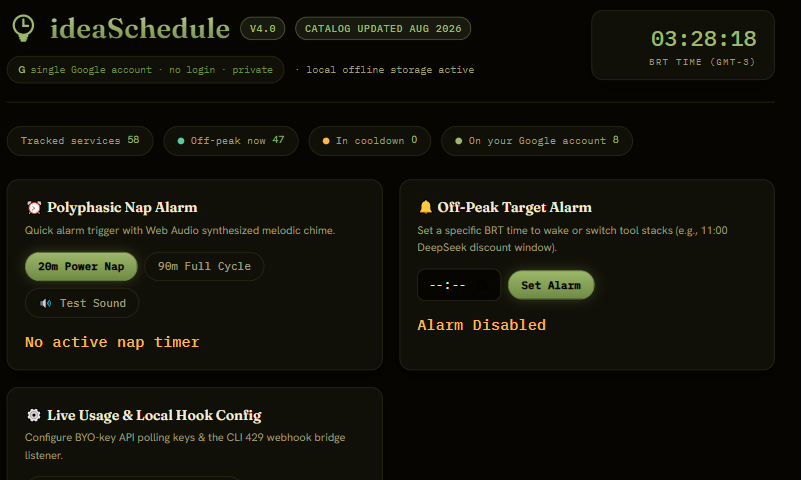
A single dashboard to see every AI agent's quota. LIVE
Catalog last updated August 2026.
- 58 AI tools cataloged
- Polyphasic nap alarm
- Off-peak window alert for the BRT time zone
- 100% local, no account, no server
WHAT IT IS
A control room so nothing slips through
When I started running several AI agents at once, it turned into a mess: each one with its own quota, its own limit, its own reset rhythm. ideaSchedule is the dashboard I built to see it all at once, with 58 cataloged tools (agent CLIs, AI IDEs, image and video generators, API providers and more) and a BRT clock that shows which window is cheapest or fastest for each one.
It's not automatic integration: you log usage manually as you use each tool, and the dashboard calculates the rest (percentage spent, reset window, whether you're in peak or off-peak).
STEP BY STEP
How to use it
Filter by category or by billing type, or search by the tool's name. On each card, the +1/+5 buttons log usage, the pencil lets you paste an exact value, and the lightning bolt marks the tool as rate-limited (starts a cooldown with an end time). The strategy strip at the top suggests which stack of tools pays off most in your current BRT window.
PRIVACY
What stays on your machine
Everything stays in localStorage, in your browser: the usage you log, the alarms you set, and the optional API keys some BYO-key integrations accept. None of it passes through any server, because ideaSchedule is static HTML, CSS, and JavaScript, no backend. No account, no login, nothing to sync.
NOTE FROM IDEABOB
Why I made this
Already on its fourth version, and it's the in-house tool that's saved me the most time. I used to constantly forget which subscription reset when, or find out too late that I'd hit a quota in the middle of a job. Now it's just a glance at the dashboard. I started it black and gold, like all my other personal apps, but once I published it I decided it deserved a look of its own, hence the olive.